


How to Reset Android Phone to Factory Settings in 5 EASY Steps

This entry is for all TP friends who've been emailing us and asking for help on how to factory reset their Android phones.
TechPinas' How to Reset Android Phone to Factory Settings in 5 Easy Steps:
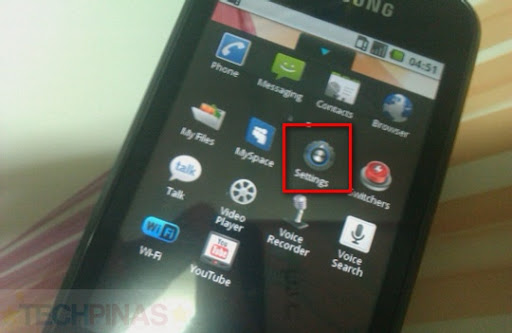
1. Go to Settings page
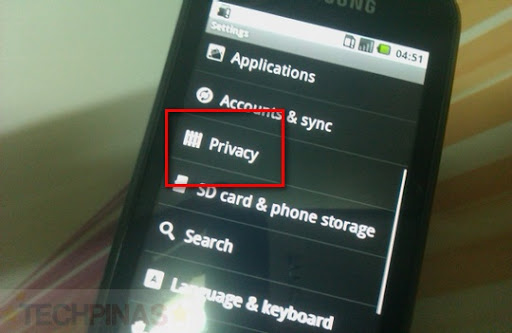
2. Under Settings, click on Privacy
3. Under Privacy, go to Factory Data Reset
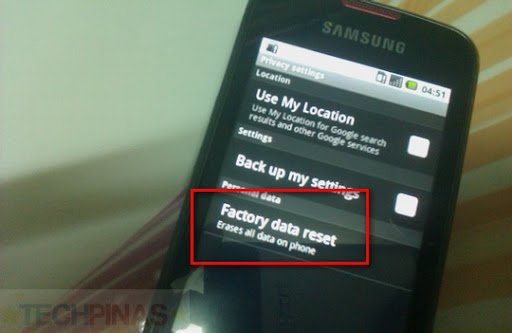
4. Under Factory Data Reset, click on Reset Phone button

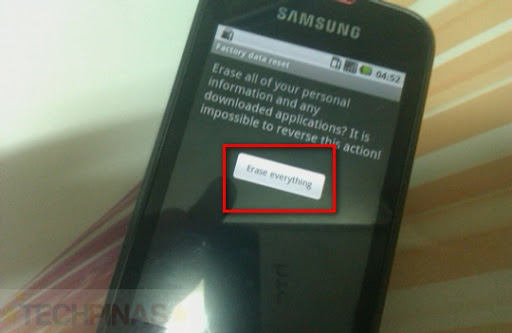
5. Click on Erase Everything button and let your phone restart itself
That's it! Quite simple, eh? I hope you find this guide helpful.
TechPinas' How to Reset Android Phone to Factory Settings in 5 Easy Steps:
1. Go to Settings page

2. Under Settings, click on Privacy

3. Under Privacy, go to Factory Data Reset

4. Under Factory Data Reset, click on Reset Phone button
5. Click on Erase Everything button and let your phone restart itself

That's it! Quite simple, eh? I hope you find this guide helpful.


.jpg)